Activity data can arrive in many different formats.
Electricity consumption may be listed on a utility bill. Fuel purchases may appear in a card statement. Waste volumes may be recorded on a contractor invoice. Refrigerant data may be provided in a spreadsheet with its own column names.
Before this data can be used in a calculation, it needs to be assigned to the correct facility and reporting period and checked for errors.
Hydrus can extract records from uploaded files, but extracted data still needs to be reviewed when there is uncertainty. A bill may cover two months. A spreadsheet may contain both kWh and MWh. A site name on an invoice may not match the facility name in your records.
Reviewing data when it arrives helps catch these issues before they affect a calculation.
Where new data goes
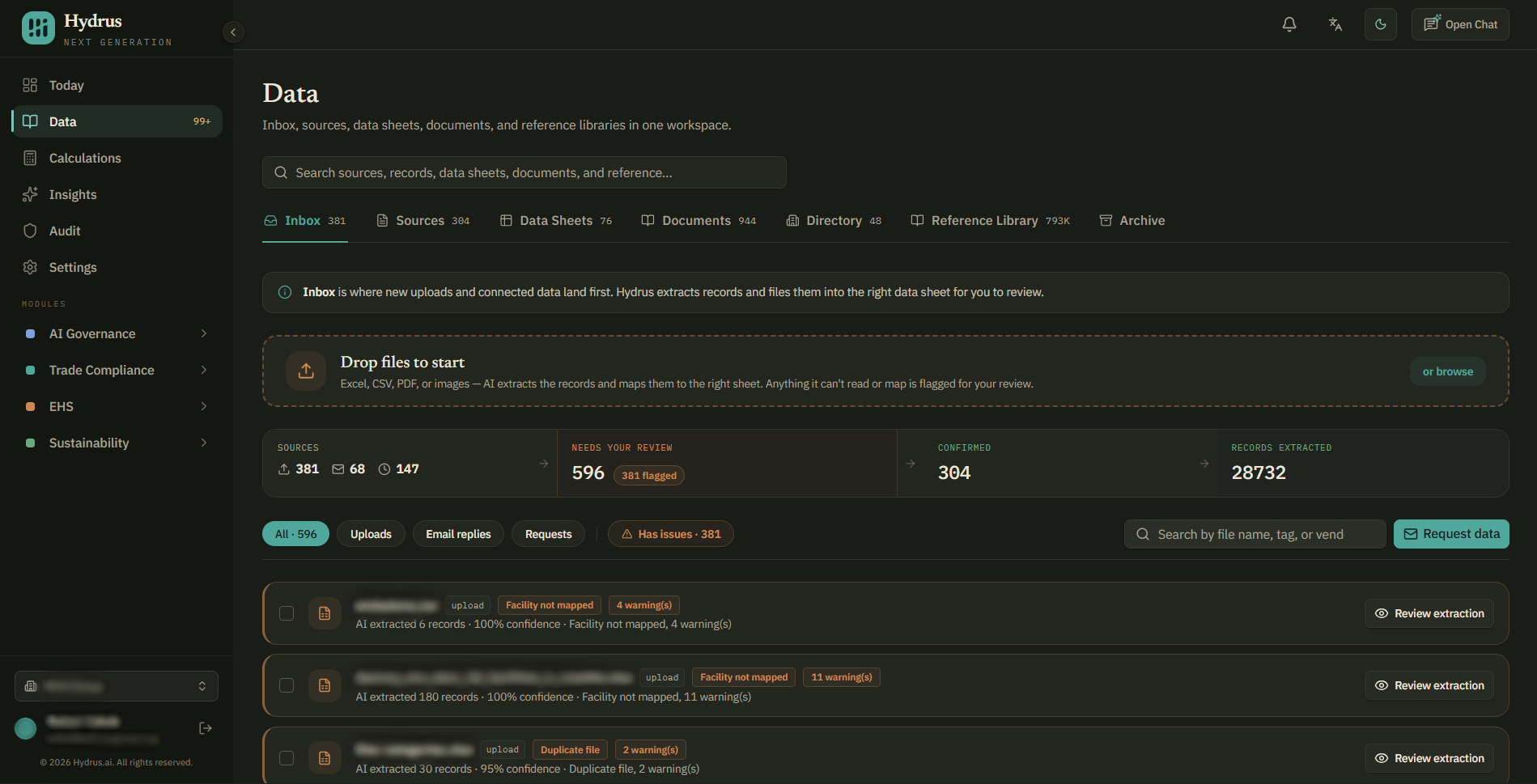
The Inbox in the Data workspace is where new uploads appear first.
You can drop files directly into the Inbox or browse for them on your computer. Hydrus accepts:
- Excel and CSV files
- PDFs
- Images, including photographed or scanned bills
After a file is uploaded, Hydrus reads it and extracts individual records. A record can include the category, facility, reporting period, value, unit, and scope.
Each extracted record also keeps a citation showing where the value came from, such as a page, sheet, column, or text snippet. Hydrus checks that citation against the source file. If the cited information cannot be found, the record's confidence is reduced and it is sent for review.
The Inbox also shows items that need attention. Use the uploads, email replies, and requests filters to see each kind of item. The has issues filter shows only items that have been flagged.
Why some data needs review
Hydrus automatically confirms a record when the required checks pass, including:
- The extraction confidence is very high.
- The citation has been verified against the source.
- The facility matches exactly one facility in the Directory.
If these conditions are not met, the record waits for review.
These checks help identify issues that require someone to understand the organization's data. For example:
- A bill may show "Main Street", but there may be several facilities with similar names.
- A bill may cover multiple months.
- A value may be correct but use a different unit from other records.
The review queue flags common issues so they can be checked first:
- Duplicate file: The same file or records may already have been uploaded.
- Facility not mapped: A site name in the file does not match a facility in the Directory.
- Warnings: A record has a missing unit, missing period, or unusual value.
- Rows dropped: A row was skipped because it was blank or did not contain a usable value.
Review an upload
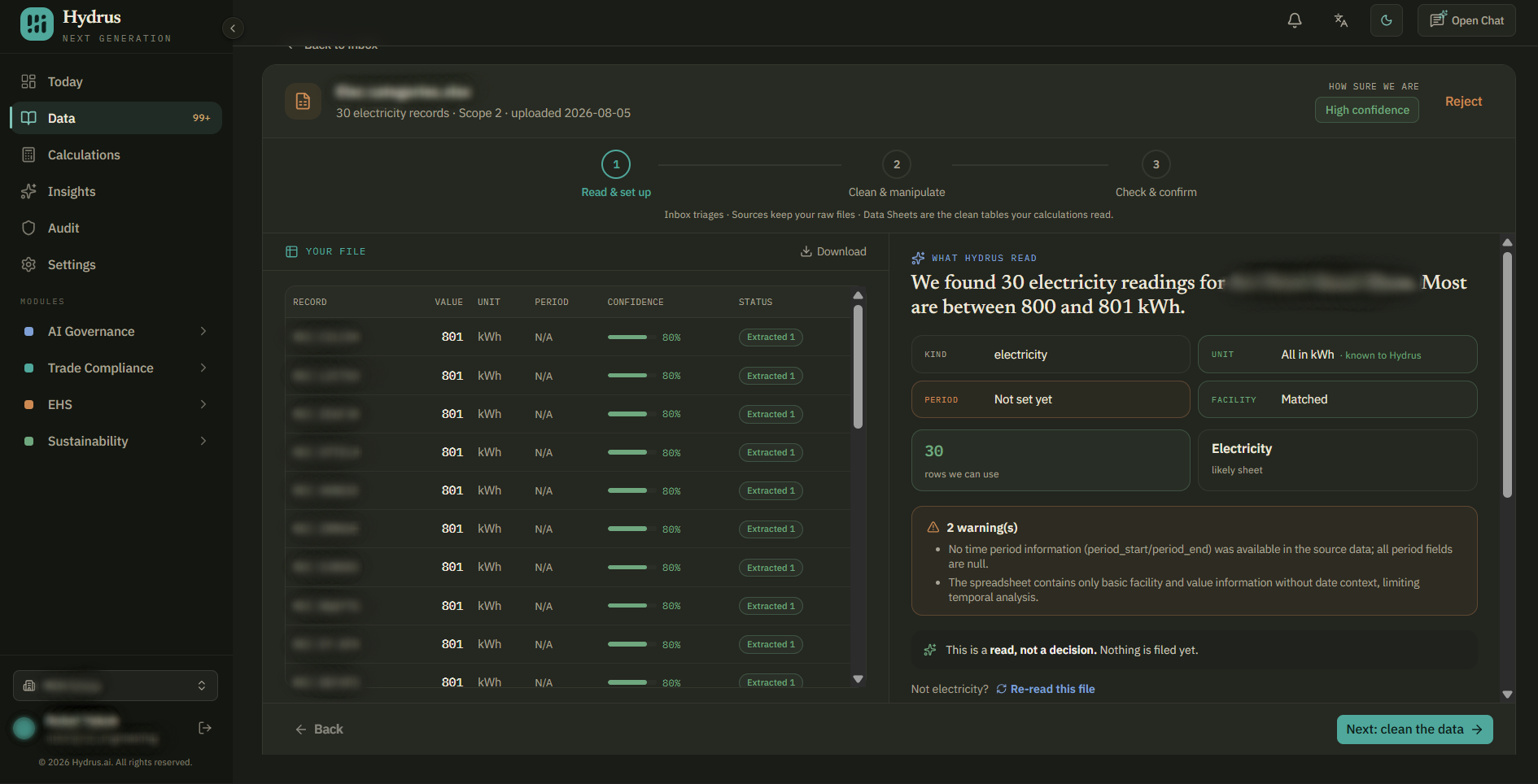
Select the review button to check an upload in three steps.
1. Read & set up
This step shows what Hydrus extracted alongside the original file.
Here you can:
- Match site names in the file to facilities.
- Mark rows that do not belong to a facility.
- Confirm which data sheet the records should be filed into.
If a site does not exist in the Directory, add it before confirming the records. Records cannot be confirmed while a row is missing a facility.
If you need more information about setting up facilities, see the Directory guide.
2. Clean & manipulate
Each row can be kept, dropped, or edited.
This is also where you fix reporting periods. If a bill covers more than one month, the allocate data option can split the value evenly across the months or assign it to a single month.
If a value is an estimate rather than a measured value, you can give it the estimated label. This keeps the estimate clearly identified in later reporting.
3. Check & confirm
The final step highlights numbers that may need another check.
For example, a value may have the outlier label because it is much larger than the other records in the file. This can indicate a unit error, such as MWh being entered as kWh.
After checking the flagged values, select the confirm & file button to add the records to the data sheet.
If the file should not be used, reject it and select a reason, such as:
- Incorrect facility
- Duplicate source
- Wrong reporting period
- Poor data quality
The rejection reason is recorded in the audit trail.
What to check before you confirm
Before confirming an upload, check:
- Facility: Every record is assigned to the correct facility.
- Period: The reporting period matches the document, and multi-month bills have been allocated correctly.
- Units: Units are consistent with previous data for the same facility and category.
- Outliers: Values marked as outliers have been checked against the original document.
- Estimates: Estimated values have the estimated label.
- Duplicates: The file has not already been confirmed.
These checks help catch problems before the data reaches a calculation.
Keep the link to the source
Confirming data does not remove the original file.
Hydrus keeps the uploaded file, and each confirmed record stays linked to its source and the citation showing where it came from.
On the Sources tab, the data lineage view shows each stage the data went through: uploaded, extracted, filed into a sheet, and confirmed.
It also shows corrections, facility mappings, and the people involved. The original file can be downloaded at any time.
This makes it possible to trace a figure in a calculation back to the data sheet, then to the confirmed record, and finally to the page or cell in the original document.
For each confirmed record, you should be able to identify:
- The document it came from
- The facility and reporting period it was assigned to
- Any corrections made
- Who confirmed it
Reviewing data when it arrives helps keep errors out of calculations, keeps estimates visible, and maintains a clear record of where the data came from.